
Data analysis has become one of the most important skills in today’s digital world. Businesses, students, marketers, and analysts rely heavily on spreadsheets to organize and analyze information. However, manually analyzing large Excel files can be time-consuming and complicated.
This is where Free AI Tools for Excel Data Analysis become extremely helpful for professionals, students, and businesses.
Artificial intelligence can automate many tasks that normally take hours. AI tools can clean messy data, detect patterns, generate charts, write formulas, and even predict future trends.
The best part is that many powerful AI tools are available for free and can easily integrate with Excel or spreadsheet data.
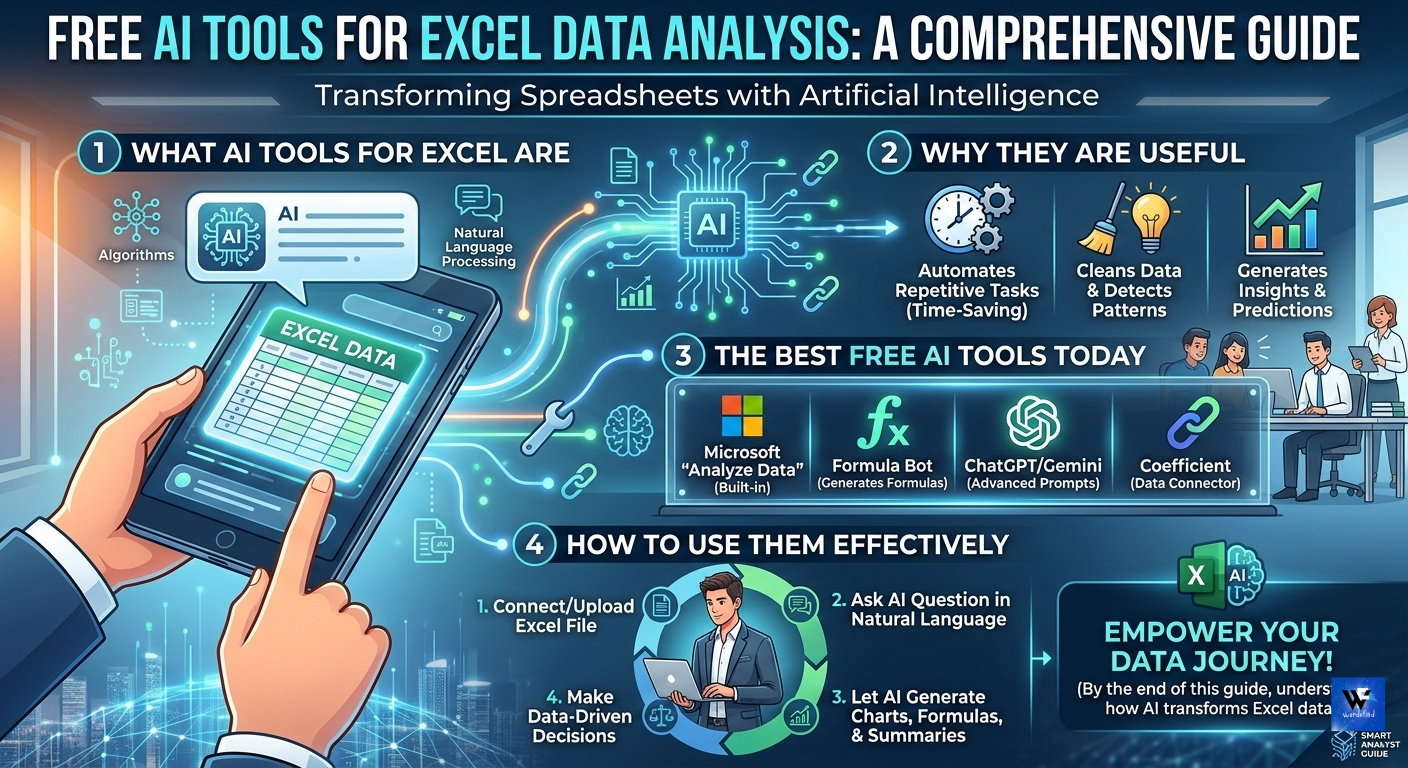
In this guide, you will learn:
- What AI tools for Excel data analysis are
- Why they are useful
- The best free AI tools available today
- How to use them effectively
By the end of this article, you will understand how AI can transform the way you work with Excel data.
What Are AI Tools for Excel Data Analysis?
AI tools for Excel data analysis are software applications powered by machine learning and artificial intelligence that help users analyze spreadsheet data automatically.
Instead of manually writing formulas or building complicated pivot tables, AI tools can:
- Analyze large datasets instantly
- Identify patterns and trends
- Generate charts and visual reports
- Suggest formulas and calculations
- Predict future outcomes
These tools act like a smart assistant for Excel users.
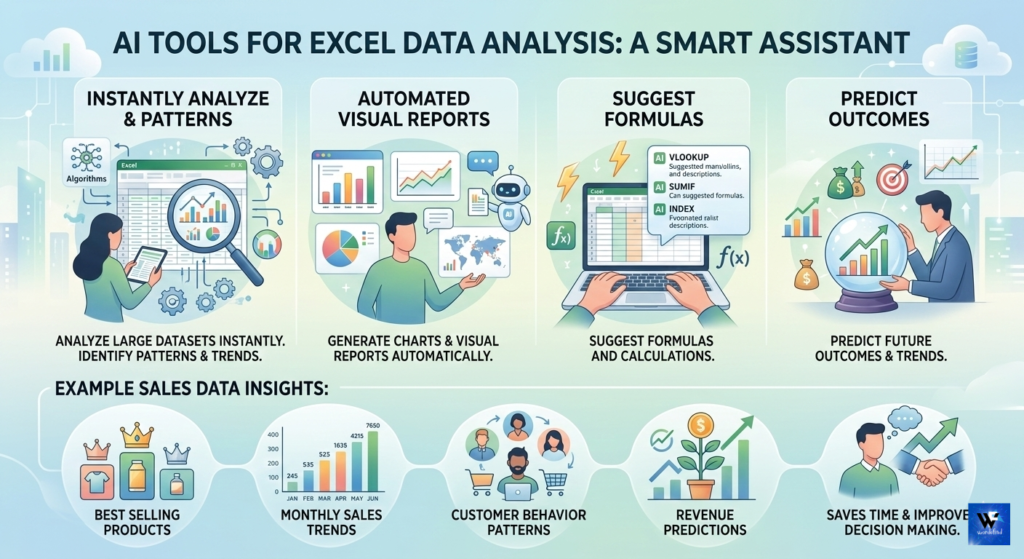
For example, if you upload a dataset containing sales records, an AI tool can automatically show:
- Best selling products
- Monthly sales trends
- Customer behavior patterns
- Revenue predictions
This saves a huge amount of time and improves decision making.
Why Use Free AI Tools for Excel Data Analysis?
Using AI for data analysis offers many advantages compared to traditional manual analysis.
1. Saves Time
Manual analysis of large spreadsheets can take hours or even days.
AI tools can process thousands of rows of data in seconds.
Tasks like:
- sorting data
- cleaning duplicates
- identifying patterns
are done automatically.
2. Reduces Human Errors
Humans often make mistakes while working with formulas or calculations.
AI tools reduce these errors by automating calculations and data processing.
This ensures more accurate results.
3. Generates Insights Instantly
AI can detect trends that may not be visible to humans.
For example:
- customer purchase patterns
- seasonal sales trends
- financial risks
These insights help businesses make better decisions.
4. Easy for Beginners
Many people avoid Excel data analysis because it requires advanced formulas.
AI tools simplify the process by allowing users to ask questions like:
“Show sales growth by month”
The AI automatically generates charts and analysis.
Best Free AI Tools for Excel Data Analysis
Now let’s explore the best free AI tools for Excel data analysis that you can start using today.
1. ChatGPT for Excel Data Analysis
One of the most powerful AI tools for analyzing Excel data is ChatGPT.
You can paste Excel data or upload CSV files and ask questions like:
- “Analyze this dataset”
- “Create a summary of sales trends”
- “Write an Excel formula”
ChatGPT can also help generate:
- Excel formulas
- Pivot table instructions
- Data insights
Key Features
- Natural language queries
- Formula generation
- Data insights
- Data cleaning suggestions
Best For
Beginners who want a simple way to analyze Excel data using AI.
2. Microsoft Copilot for Excel
Microsoft has introduced AI-powered Copilot inside Excel.
Copilot can analyze spreadsheets automatically and generate insights.
You can ask questions like:
- “Show the top performing products”
- “Create a revenue forecast”
The AI instantly produces charts and summaries.
Key Features
- Built directly into Excel
- Automatic charts
- Data trend analysis
- Natural language queries
3. SheetAI
SheetAI is a powerful AI tool designed specifically for Google Sheets.
However, you can easily import Excel data into Google Sheets and use it.
SheetAI can generate formulas, analyze data, and automate tasks.
Key Features
- AI formula generator
- Data summarization
- Automation features
- Integration with Google Sheets
4. Akkio
Akkio is a no-code AI platform designed for data analysis and predictions.
You can upload Excel datasets and use AI to create predictive models.
Key Features
- AI forecasting
- Data visualization
- Machine learning models
- Easy interface
5. Rows AI
Rows AI is a modern spreadsheet tool that combines spreadsheets with AI.
It allows users to analyze Excel-like data with powerful AI automation.
Key Features
- AI data analysis
- Automated insights
- Data enrichment
- Integrations with apps
6. Polymer AI
Polymer is a smart data analysis tool that converts spreadsheets into interactive dashboards.
You simply upload your Excel file and Polymer generates insights automatically.
Key Features
- Automatic dashboards
- Data pattern detection
- Interactive charts
- Easy visualization
7. MonkeyLearn
MonkeyLearn is an AI text analysis tool useful for analyzing textual data in Excel.
For example:
- customer reviews
- feedback forms
- survey responses
It can classify and analyze text automatically.
Key Features
- Sentiment analysis
- Text classification
- Keyword extraction
- Data visualization
8. Obviously AI
Obviously AI helps users build machine learning models without coding.
You can upload Excel data and create predictive analytics instantly.
Key Features
- Predictive analytics
- Automated machine learning
- Data insights
- Easy setup
How to Use AI Tools with Excel Data
Using AI tools for Excel data analysis is very simple.
Here is a basic process.
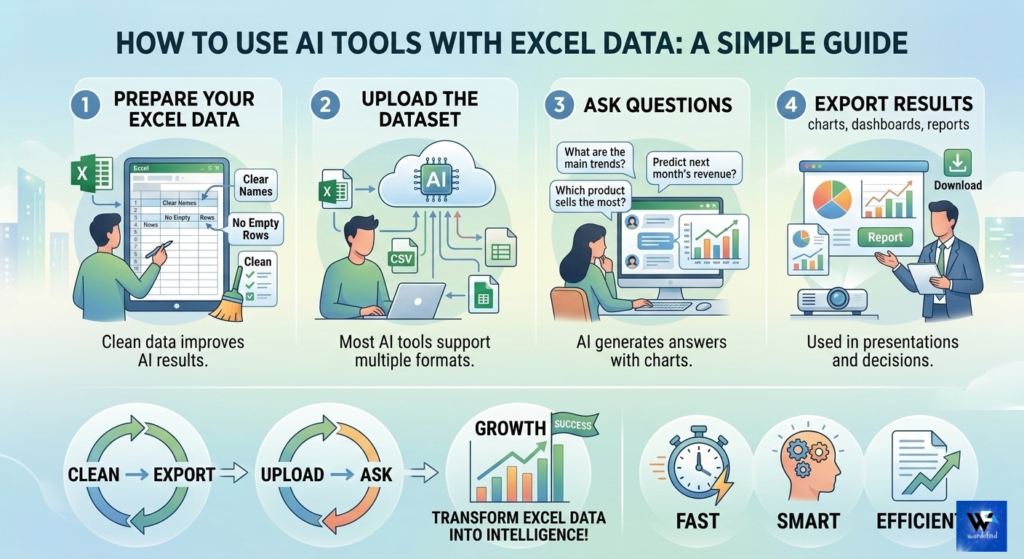
Step 1: Prepare Your Excel Data
Before uploading your data to AI tools, make sure:
- Columns have clear names
- No empty rows
- No duplicate values
Clean data improves AI results.
Step 2: Upload the Dataset
Most AI tools allow you to upload files such as:
- Excel (.xlsx)
- CSV files
- Google Sheets
Once uploaded, the AI will start analyzing the dataset.
Step 3: Ask Questions
You can ask AI questions like:
- What are the main trends?
- Which product sells the most?
- Predict next month’s revenue.
The AI will generate answers with charts and insights.
Step 4: Export Results
After analysis, you can export results as:
- charts
- dashboards
- reports
These reports can be used in presentations or business decisions.
AI Features That Improve Excel Data Analysis
AI tools provide several powerful features that improve spreadsheet analysis.
Automated Data Cleaning
Data cleaning is one of the most time-consuming tasks.
AI can automatically:
- remove duplicates
- fill missing values
- standardize formats
This ensures clean datasets for analysis.
Smart Data Visualization
AI tools can convert raw data into visual charts such as:
- bar charts
- line graphs
- pie charts
- dashboards
Visualization helps understand data faster.
Predictive Analytics
One of the biggest advantages of AI is predictive analysis.
AI models can forecast:
- future sales
- demand trends
- customer behavior
Businesses use these predictions to make strategic decisions.
Formula Generation
Many users struggle with complex Excel formulas.
AI tools can generate formulas automatically.
For example:
- VLOOKUP
- INDEX MATCH
- SUMIF
- IF formulas
You just describe the task and AI writes the formula.
Real-World Use Cases of AI Excel Analysis
AI powered Excel analysis is used in many industries.
Business Analytics
Companies analyze:
- sales performance
- marketing campaigns
- financial reports
AI tools help identify growth opportunities.
Marketing Analysis
Marketers analyze campaign data such as:
- website traffic
- conversions
- customer demographics
AI can quickly find patterns that improve marketing strategies.
Financial Forecasting
Finance teams use AI to predict:
- revenue trends
- expenses
- investment risks
This helps businesses plan future budgets.
Customer Data Analysis
Businesses analyze customer data to understand:
- buying behavior
- preferences
- satisfaction levels
AI tools can identify valuable customer insights.
Limitations of Free AI Tools
Although free AI tools are powerful, they also have some limitations.
Limited Data Upload
Free plans often restrict the size of datasets.
Limited Features
Advanced features like automation or predictive models may require paid plans.
Data Privacy
Uploading sensitive data to AI tools requires caution.
Always check the privacy policy.
Future of AI in Excel Data Analysis
Artificial intelligence is rapidly transforming data analysis.
In the future, Excel users may not need to write formulas at all.
Instead, they will simply ask questions in natural language like:
“Show sales growth over the last 5 years.”
AI will automatically generate charts, dashboards, and reports.
As AI technology continues to improve, spreadsheet analysis will become faster, easier, and more powerful.
Conclusion
Free AI tools for Excel data analysis are revolutionizing the way people work with spreadsheets.
Instead of spending hours writing formulas and sorting data, AI tools can analyze datasets in seconds.
From generating insights to predicting trends, these tools make data analysis easier for beginners and professionals alike.
Some of the best free tools include:
- ChatGPT
- Microsoft Copilot
- SheetAI
- Rows AI
- Polymer AI
- Akkio
By using these tools effectively, you can save time, improve accuracy, and make smarter decisions based on data.
If you regularly work with spreadsheets, exploring these free AI tools for Excel data analysis can significantly boost your productivity.